How the features work
Each section says what the user sees, where the code is, and the one non-obvious thing. Facts here were checked against the running app.
Faceted search (/movies)
Code: src/pages/Results.tsx, src/search/FilterSidebar.tsx, src/lib/filters.ts.
- Filters: title text, genres (several), decades (several), minimum rating, maximum runtime, and a person (cast or director). Sort: rating, newest, oldest, title, shortest.
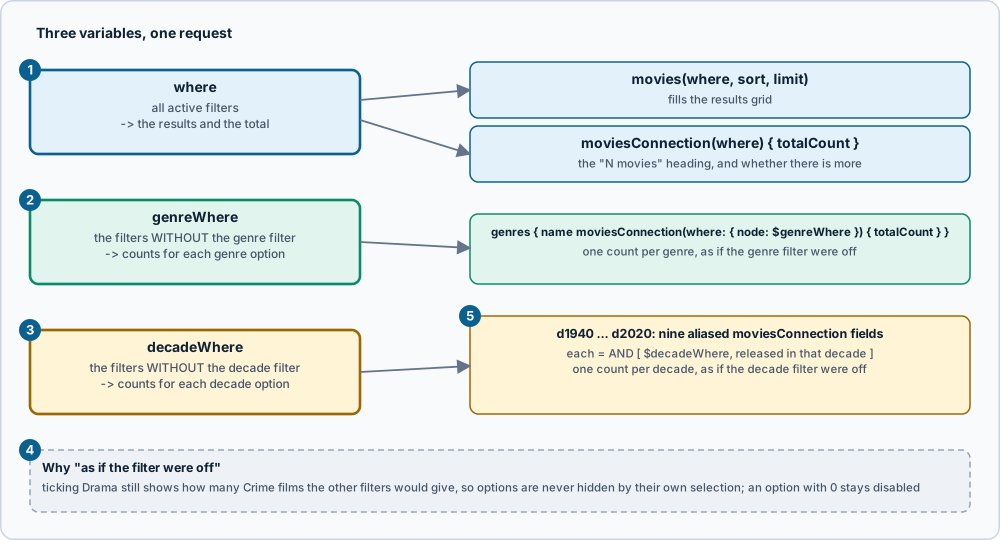
Figure: how one request returns the movies, the total and every filter option’s count. Click the image for full size; the numbered notes below carry the same information as text.
where. All active filters: used for the results grid and the total in the heading.genreWhere. The filters without the genre filter, used to count each genre option.decadeWhere. The filters without the decade filter, used to count each decade (nine aliased fields in the same operation).- Why “as if the filter were off”. Ticking Drama still shows how many films each other genre would give; options are not hidden by their own selection, and an option with 0 stays disabled.
$decadeWhereis non-null. It is used inside a list literal, so it is declaredMovieWhere!and the app always sends{}rather thannull.
- Facet counts respect the other filters. Results is one GraphQL operation with several fields:
movies(where: $where, ...)andmoviesConnection(where: $where) { totalCount }for the results and the total;genres { name moviesConnection(where: { node: $genreWhere }) { totalCount } }, where$genreWhereis the current filters without the genre filter, so selecting Drama still shows how many films each other genre would give;- nine aliased
moviesConnectionfields, one per decade (d1940…d2020), using$decadeWhere(the filters without the decade filter) combined with that decade’s year range.
- Options with a count of zero are disabled unless already selected.
- Title search is case-sensitive in the API (
contains), sobuildWherematches the text as typed, in Title Case and in lower case. - 24 results per page; “Show more” raises the
limit. - Gotcha for new facets:
$decadeWhereis declaredMovieWhere!(non-null) because it is used inside a list literal; always send{}rather thannull.
People browser (/people)
Code: src/pages/People.tsx, src/lib/peopleFilters.ts, src/search/PersonCard.tsx.
- Role chips (Everyone, Actors, Directors) with counts, a name search, a minimum-films select and a sort (most films, name).
- Sorting and role filtering use the stored
actedCountanddirectedCountproperties onPerson, because computed fields cannot be sorted in plain GraphQL. The server recalculates them after every mutation (seedocs/mutations.mdin thegrandstack-serverrepo). - Role counts use the same trick as facets: an operation field per role with the filters minus the role.
Person page (/people/:name)
Code: src/pages/PersonDetail.tsx, src/graph/PersonGraph.tsx.
- Stats (films, active years, average rating, top genres) are computed in the browser from the person’s filmography, since a person has at most a few dozen films.
- Filmography is split into “Acted in” and “Directed” with a sort control.
- “Frequent collaborators” comes from the server’s
Person.collaboratorsfield (a Cypher traversal ranked by shared films). - The career graph shows the person, up to 12 acted-in films, up to 12 directed films and up to 6 collaborators.
Movie page and recommendations (/movies/:title)
Code: src/pages/MovieDetail.tsx, src/graph/MovieGraph.tsx.
- “You might also like” is the server’s
Movie.similarfield: films scored by shared director (3), shared cast (2) and shared genre (1). - The graph shows the movie with its directors, up to 10 cast members and its genres. Clicking a person opens their page; clicking a genre opens filtered results.
Graph views
Code: src/graph/GraphView.tsx (shared), MovieGraph.tsx and PersonGraph.tsx (build nodes and links).
GraphView wraps react-force-graph-2d (lazy-loaded) and draws nodes on a canvas. To add a graph for another page, build a list of { id, label, kind } nodes and { source, target, label } links and render <GraphView ... /> with a legend and a click handler. Edge labels are the Neo4j relationship types.
Compare (/compare)
Code: src/lib/compare.tsx, src/pages/Compare.tsx, the tray in src/App.tsx.
- Tick “Compare” on up to four movies; the selection survives reloads (
localStorage). - The page highlights the best rating and shortest runtime and shows cast shared by more than one selected movie in bold.
- The tray is hidden on the compare screen and on create/edit forms, because a fixed bar at the bottom would cover the form buttons.
Create, edit and delete
Code: src/forms/*, src/pages/MovieNew.tsx, MovieEdit.tsx, PersonNew.tsx, PersonEdit.tsx.
MovieFormedits fields, genres (existing or new), directors and cast with roles.PersonPickeris a typeahead over existing people with a “Create new person” option; people are connected if they exist and created if not.src/forms/model.tsholds the logic and has unit tests:validateMovie,validatePerson(title and name required, year 1888 to 2100, rating 0 to 10, runtime 1 or more, no duplicate cast member);buildCreateInputmakes thecreateMoviesinput (connect existing, create new, roles on edges);buildUpdateInput(before, after, existingGenres)makes theupdateMoviesinput as a diff (disconnect what was removed, connect or create what was added, one edge update per changed role). It never sends “disconnect all, then connect”, because the server runs disconnects last and would remove the new links;friendlyErrorturns the unique-constraint error into a readable message.
- Roles are typed as one text box; several roles for one person are separated by semicolons.
- Editing a field clears its error until the next submit; submit focuses the first invalid field.
- Deleting asks for confirmation in a native
<dialog>(focus trapped, Esc cancels). Every form shows a banner that there is no authentication.
Posters and avatars
Code: src/poster/Poster.tsx, src/ui/Avatar.tsx.
Posters are generated, not downloaded. hash(title) (FNV-1a) picks gradient angle and hues; the first genre sets the base hue (GENRE_HUE). The same title always gives the same poster. Avatars use the same hash on the person’s name and show initials. Change the look by editing posterStyle and GENRE_HUE.
Theme
Code: src/theme/tokens.css, useTheme in src/App.tsx.
Dark is the default; the header toggle switches to light and remembers the choice. Colours are CSS custom properties on :root and :root[data-theme="light"].
Source: grandstack-web/docs/features.md (this page is a copy; edit it in the repository)