Architecture of grandstack-web
grandstack-web is a single-page React app that talks to grandstack-server over GraphQL. It is a movie and people search, filter, compare and edit app, written to show what a GraphQL-on-Neo4j front end looks like and to be adapted to your own data.
Applies to grandstack-web v0.5.1 (React 19, Vite 8, urql 5, GraphQL Code Generator, TypeScript).
Stack
| Concern | Choice | Notes |
|---|---|---|
| UI | React 19 + react-router 8 | Client-side routes; nginx falls back to index.html. |
| GraphQL client | urql 5 with cacheExchange and fetchExchange | Default request policy is cache-and-network. |
| Types | GraphQL Code Generator, client preset | Operations written with the graphql() tag are typed from the live schema. |
| Animation | motion | Respects prefers-reduced-motion. |
| Graph view | react-force-graph-2d (MIT) | Neo4j’s own NVL has a custom licence, so it is not used. |
| Styling | Plain CSS with design tokens | src/theme/tokens.css, styled after Neo4j’s Needle design system (see customising). |
| Posters, avatars | Generated in the browser | No image files. |
Folder map
src/
  main.tsx                 urql client, router, motion config
  App.tsx                  routes, header, Add menu, compare tray, theme toggle
  pages/                   one component per route (Home, Results, MovieDetail, MovieNew, MovieEdit,
                           People, PersonDetail, PersonNew, PersonEdit, Compare)
  search/                  FilterSidebar, MovieCard, PersonCard
  forms/                   MovieForm, PersonForm, PersonPicker, DeleteButtons, and model.ts (pure logic)
  graph/                   GraphView (shared), MovieGraph, PersonGraph
  lib/                     filters.ts, peopleFilters.ts (URL state and GraphQL where/sort), compare.tsx,
                           hash.ts and initials.ts (small helpers used by posters and avatars)
  poster/Poster.tsx        generated poster art
  ui/                      Button, Chip, Checkbox, RatingBadge, Skeleton, Avatar, ConfirmDialog, PublicEditBanner
  theme/tokens.css         colours, spacing, radii, light and dark
  styles.css               all component styles
  graphql/generated/       committed output of codegen (do not edit)
e2e/                       browser end-to-end checks (see e2e/README.md)
codegen.ts                 where the schema comes from and which files hold operations
nginx.conf, Dockerfile     production image
Routes
| Path | Page | Purpose |
|---|---|---|
/ | Home | Hero search, genre chips, top rated, newest, most prolific actors and directors |
/movies | Results | Faceted search with filters in the URL |
/movies/new | MovieNew | Create a movie |
/movies/:title | MovieDetail | Facts, cast, graph, recommendations |
/movies/:title/edit | MovieEdit | Edit or delete a movie |
/people | People | Browse people by role |
/people/new | PersonNew | Create a person |
/people/:name | PersonDetail | Stats, filmography, collaborators, graph |
/people/:name/edit | PersonEdit | Edit or delete a person |
/compare | Compare | Up to four movies side by side |
/new | redirect | Goes to /movies/new |
Titles and names are the keys, so they appear URL-encoded in paths (/people/Timoth%C3%A9e%20Chalamet).
Data flow
State lives in the URL, not in component state, for anything a user might want to share or reload:
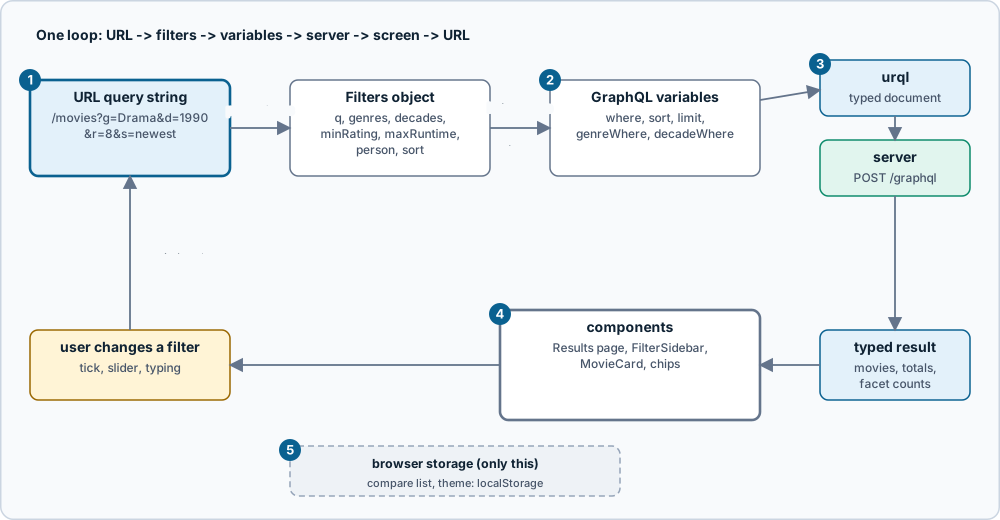
Figure: one loop from the URL to the screen and back. Click the image for full size; the numbered notes below carry the same information as text.
- The URL is the source of truth. Filters live in the query string (
g,d,r,rt,p,s,q), so results are shareable, reloadable and work with the back button. - Pure functions in the middle.
parseFilters,buildWhereandbuildSortturn the query string into thewhereandsortvariables; they are unit-tested.buildWherecan leave one facet out, which is how facet counts work. - Typed documents. Every operation is written with
graphql()and typed bynpm run codegenagainst the live schema, so a wrong field fails at codegen ortsc. - Components only render and emit events. A changed filter calls
serializeFiltersandsetSearchParams, which closes the loop. Text inputs keep local state and debounce the URL update, otherwise fast typing drops characters. - Almost nothing else is stored. Only the compare list and the theme are kept in
localStorage.
src/lib/filters.tsowns the movie filters (q,ggenres,ddecades,rminimum rating,rtmaximum runtime,pperson,ssort).src/lib/peopleFilters.tsowns the people filters (q,role,mfminimum films,s). Both are pure functions with unit tests.- Text inputs that write to the URL keep local state and debounce the URL update (see
People.tsx). Binding an input straight to the URL drops characters when typing fast, because the URL update is asynchronous. - The compare selection (
localStoragekeygrandstack.compare, at most four titles) and the theme (grandstack.theme) are the only browser-stored state. - Every GraphQL document is written next to the component that uses it with the
graphql()tag fromsrc/graphql/generated. Codegen validates it against the live schema and generates the result types, so a typo in a field name fails at codegen time and a wrong use of a result field fails attsc.
Caching and freshness
The urql client uses requestPolicy: "cache-and-network": pages show cached data immediately and always refetch, so lists and counts are fresh after an edit without wiring cache invalidation by hand. Edit forms use network-only so they never start from stale data. The server refreshes stored film counts after every mutation, so a refetch after a save is correct.
Build and deploy
npm run build type-checks and builds static files with Vite. The Dockerfile builds them and serves them with unprivileged nginx on port 8080, with long-lived caching for /assets/ and a fallback to index.html for client routes.
VITE_GRAPHQL_URL is baked in at build time (a build argument in the Dockerfile, default http://localhost:4000/graphql). It must be a URL the browser can reach, not a container-internal hostname. The server’s CORS_ORIGIN must allow the web origin.
Next: features, customising, recipes, testing.
Source: grandstack-web/docs/architecture.md (this page is a copy; edit it in the repository)