Mutations
@neo4j/graphql generates create, update and delete mutations for each node type. The examples below use the Movies schema and have been run against a live server. Send them as POST /graphql with content-type: application/json, or paste the GraphQL into GraphiQL.
Create, including relationships
mutation Create($input: [MovieCreateInput!]!) {
  createMovies(input: $input) { movies { title } }
}
{
  "input": [{
    "title": "My Film",
    "released": 2024,
    "genres":    { "connect": [{ "where": { "node": { "name": { "eq": "Drama" } } } }],
                   "create":  [{ "node": { "name": "Brand New Genre" } }] },
    "directors": { "connect": [{ "where": { "node": { "name": { "eq": "Nora Ephron" } } } }] },
    "actors":    { "connect": [{ "where": { "node": { "name": { "eq": "Tom Hanks" } } }, "edge": { "roles": ["Hero"] } }],
                   "create":  [{ "node": { "name": "New Person" }, "edge": { "roles": ["Villain", "Boss"] } }] }
  }]
}
connectlinks to something that already exists (matched bywhere).createmakes a new node and links it.edgeholds the relationship properties (hereroles, fromActedIn).- Creating something that already exists (a duplicate title, or a
createof an existing name) fails withConstraint validation failedand nothing is saved.
Update
Scalar fields use set operators, not plain values:
mutation { updateMovies(where: { title: { eq: "My Film" } }, update: { tagline: { set: "A new tagline" }, rating: { set: 7.5 } }) { movies { title tagline } } }
{ set: null }clears an optional field.- Passing a bare value fails validation: inline (
tagline: "x") withExpected value of type "StringScalarMutations", found "x", and through variables withExpected type "StringScalarMutations" to be an object. - Renaming the key field works the same way:
title: { set: "New title" }.
Changing relationships: send a diff
Each relationship field on the update input is a list of operations. Use disconnect, connect, create and update:
{
  "actors": [
    { "disconnect": [{ "where": { "node": { "name": { "in": ["Tom Hanks"] } } } }],
      "connect":    [{ "where": { "node": { "name": { "eq": "Brad Pitt" } } }, "edge": { "roles": ["Cameo"] } }],
      "create":     [{ "node": { "name": "ZZ New" }, "edge": { "roles": ["Extra"] } }] },
    { "update": { "where": { "node": { "name": { "eq": "Meg Ryan" } } }, "edge": { "roles": { "set": ["Changed"] } } } }
  ]
}
updateis a single object per list entry (not a list), so changing the roles of several people takes one list entry each.- Do not “disconnect everything, then connect the new set” in one mutation. In v7 the disconnect runs after the connect, which removes the links you just made (the result is an empty cast). Send only what changed. The web app’s
buildUpdateInputingrandstack-web/src/forms/model.tsdoes this and has unit tests for it. disconnectwithwhere: {}removes all links; only do that on its own, not combined withconnect.
Delete
mutation { deleteMovies(where: { title: { eq: "My Film" } }) { nodesDeleted relationshipsDeleted } }
Deleting a node also deletes its relationships (it detaches), but the nodes at the other end stay: deleting a movie keeps its people and genres, and deleting a person removes them from the casts of their films. Both return counts of what was removed.
Stored counts are refreshed after every mutation
Person.actedCount and directedCount are stored properties (seeding). src/refreshCountsPlugin.ts is a Yoga plugin that wraps execution: after any operation whose type is mutation, it runs the recalculation in src/counts.ts and only then returns the response. A client that refetches straight after a mutation therefore sees correct counts. Details:
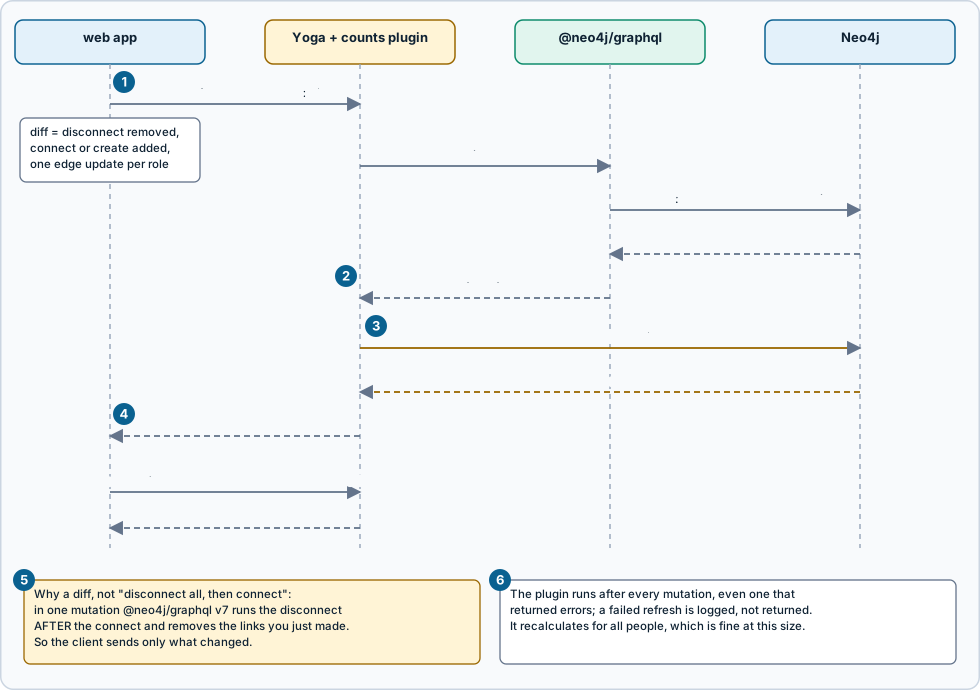
Figure: an edit from the web app, step by step. Click the image for full size; the numbered notes below carry the same information as text.
- One update with only the changes. A diff:
disconnectwhat was removed,connectorcreatewhat was added, one edge update per changed role. - The library applies it.
@neo4j/graphqlruns the update as one Cypher transaction and hands the result back to the plugin that wrapped it. - Then the counts refresh. The plugin recalculates
actedCountanddirectedCountfor all people before the response goes out. - The response is built before the refresh. Counts selected inside a mutation result can be
nullor one step behind; read them with a query afterwards. - Why a diff. In one mutation v7 runs a disconnect after the connect, so “disconnect all, then connect the new set” removes the new links.
- Always and everywhere. It runs after every mutation, even one that returned errors, and a failed refresh is logged, not returned.
- It also runs when the mutation returned errors, because a partly applied mutation may still have changed credits.
- If the refresh itself fails, the error is logged and the mutation result is returned unchanged.
- It recalculates for all people on each mutation. That is fine at this size (a few hundred people); for a large graph, change
REFRESH_COUNTS_CYPHERinsrc/counts.tsto touch only affected nodes, or setREFRESH_COUNTS=falseif you have no derived values. - It applies to every client: the web app,
curl, or an agent. - The mutation’s own response is built before the refresh. Counts selected inside a mutation result can be
null(a new person) or one step behind. Read them with a query after the mutation. The web app refetches, so it always shows the refreshed values.
Trying it
curl -s localhost:4000/graphql -H 'content-type: application/json' -d '{"query":"mutation { createPeople(input:[{name:\"Test Person\"}]) { people { name } } }"}'
# counts are refreshed after the mutation, so read them with a separate query:
curl -s localhost:4000/graphql -H 'content-type: application/json' -d '{"query":"{ people(where:{name:{eq:\"Test Person\"}}) { name actedCount directedCount } }"}'
curl -s localhost:4000/graphql -H 'content-type: application/json' -d '{"query":"mutation { deletePeople(where:{name:{eq:\"Test Person\"}}) { nodesDeleted } }"}'
Source: grandstack-server/docs/mutations.md (this page is a copy; edit it in the repository)