How grandstack-server works
grandstack-server is a small Node service that exposes a GraphQL API over a Neo4j database. You describe your data in a GraphQL schema file; @neo4j/graphql turns it into a full API (queries, filters, sorting, create/update/delete) and translates every request into Cypher. GraphQL Yoga serves it over HTTP.
Applies to grandstack-server v0.7.1 (@neo4j/graphql 7.6.4, graphql 16.14, Node 22 or later).
What is in the repo
| Path | Purpose |
|---|---|
src/index.ts | Entry point: wires everything together (below). |
src/config.ts | Reads and validates environment variables (configuration). |
src/seed.ts | Loads the seed Cypher file when needed (seeding). |
src/counts.ts, src/refreshCountsPlugin.ts | Keeps stored film counts correct after mutations (mutations). |
schema/schema.graphql | The API. Your types, fields and relationships (schema guide). |
seed/movies.cypher | Sample data (152 films, 464 people). |
tooling/neo4j-directives.graphql | Stub declarations of Neo4j directives so lint and breaking-change tools can read the schema. |
scripts/ | schema-check.sh (breaking changes), generate-schema-docs.mjs, check-links.mjs. |
test/ | Unit tests (vitest). |
Dockerfile | Multi-stage build, runs as the non-root node user. |
Startup sequence
src/index.ts runs these steps in order. If any step throws, the process exits with the error, so a bad configuration fails fast.
- Read configuration from environment variables.
NEO4J_URIandNEO4J_PASSWORDare required. - Create the Neo4j driver and call
verifyConnectivity. This fails immediately if Neo4j is unreachable or the credentials are wrong. - Seed (unless
SEED=false): decide whether to loadseed/movies.cypher(rules). - Run setup Cypher from
SETUP_CYPHER_PATHS, if set (idempotent constraints, indexes and data fix-ups, run at every start, after the seed so it also applies to freshly loaded data). - Read the schema: the file at
SCHEMA_PATHplus anySCHEMA_EXTRA_PATHS, joined, and build the executable schema withnew Neo4jGraphQL({ typeDefs, driver, features }).getSchema(). If theAUTH_*variables are set,features.authorizationis a remote JWKS with issuer and audience checks. WithFEDERATION=trueit callsgetSubgraphSchema()instead, which needs a federation@linkin the schema. Schema errors, for example a missing@node, surface here. - Create the Yoga server with CORS, the counts plugin (if
REFRESH_COUNTSis notfalse) and the per-request context below. - Listen on
PORT. The GraphQL endpoint is/graphql; opening it in a browser shows GraphiQL. - On
SIGINTorSIGTERMit closes the HTTP server and the driver.
What happens to a request
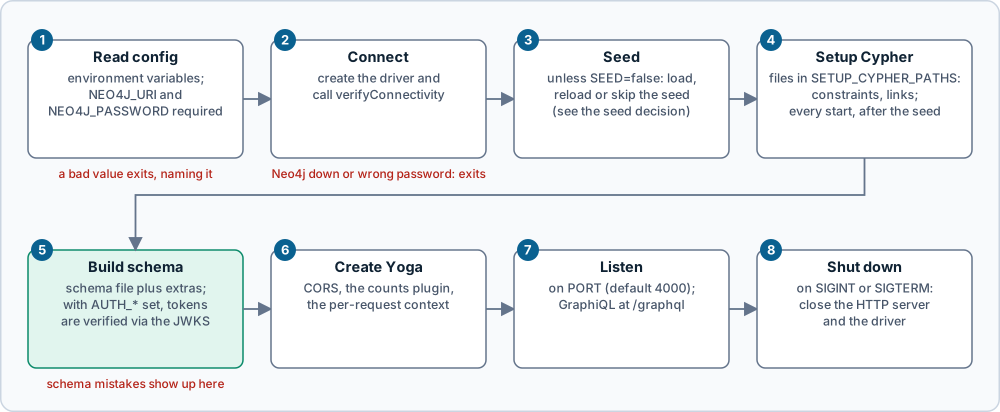
Figure: the eight start-up steps in order. Click the image for full size; the numbered notes below carry the same information as text.
- Read config. Environment variables;
NEO4J_URIandNEO4J_PASSWORDare required, and a bad value exits with a message that names it. - Connect. Create the driver and call
verifyConnectivity; an unreachable Neo4j or a wrong password exits here. - Seed. Unless
SEED=false, decide whether to load the seed file (see the seed decision in seeding). - Setup Cypher. Run the files in
SETUP_CYPHER_PATHSon every start, after the seed (idempotent constraints, indexes and data fix-ups). - Build the schema. The base schema file plus
SCHEMA_EXTRA_PATHS; with theAUTH_*variables set, tokens are verified against the JWKS. Schema mistakes (for example a missing@node) surface here. - Create Yoga. CORS, the counts plugin (unless
REFRESH_COUNTS=false) and the per-request context. - Listen. On
PORT(default 4000); GraphiQL is at/graphql. - Shut down. On
SIGINTorSIGTERMclose the HTTP server and the driver.
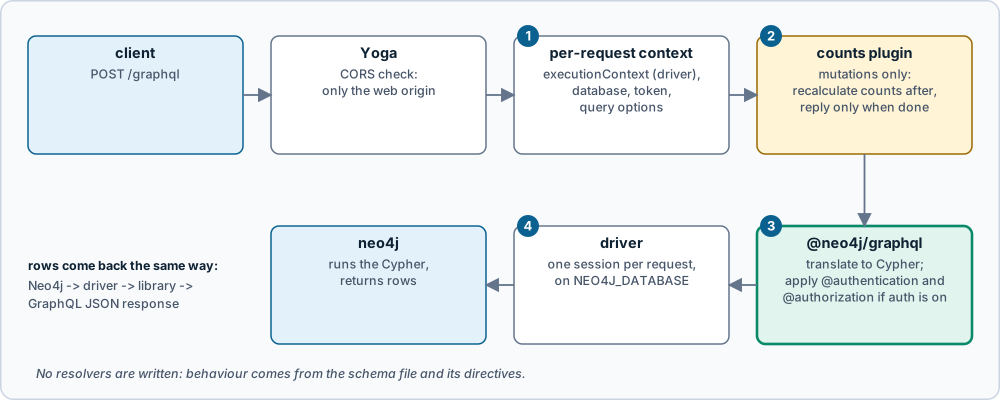
Figure: the path every request takes. Click the image for full size; the numbered notes below carry the same information as text.
- Per-request context.
executionContext(the driver),sessionConfig.database,token(theAuthorizationheader) andcypherQueryOptions. - Counts plugin. Wraps execution for mutations only: after the operation runs it recalculates the stored counts, then returns.
- The library does the work.
@neo4j/graphqltranslates the operation to Cypher and applies@authenticationand@authorizationrules when auth is on. - Driver and database. One session per request on
NEO4J_DATABASE; rows come back the same way as a GraphQL JSON response.
Nothing in this repo writes resolvers. Behaviour comes from the schema file and the directives in it.
The per-request context
Yoga calls context for every request in src/index.ts. @neo4j/graphql reads these keys:
| Key | Value here | What it does |
|---|---|---|
executionContext | the shared driver | The driver (or session or transaction) used to run the generated Cypher. With a driver, the library opens a session for each request. |
sessionConfig.database | NEO4J_DATABASE (default neo4j) | Database every request runs against. Only used when executionContext is a driver. |
token | the Authorization header, if any | A bearer token (with or without Bearer ). Ignored unless the AUTH_* variables are set; then it is verified and its claims drive @authentication and @authorization (schema guide). |
cypherQueryOptions.addVersionPrefix | NEO4J_CYPHER_VERSION_PREFIX (default false) | true prefixes generated queries with the Cypher version the library targets; false lets the database use its default. |
Other keys exist but are not set. jwt supplies an already-decoded token payload and takes precedence over token. cypherParams supplies named parameters that @cypher fields can reference as $name, for example a tenant id. transaction sets metadata and a timeout for the transaction. The rest of cypherQueryOptions (runtime, planner, replan, and so on) are query-tuning options left at the database default.
Limits to know about
- Titles and names act as keys (unique constraints), so there are no ids. See seeding.
- Community Neo4j supports one database, which is why the default is
neo4j. graphqlmust stay on 16.x, because@neo4j/graphql7.6.4 declares it as a peer dependency (graphql 17 is newer but not supported).- Authentication is off by default. With no
AUTH_*variables anyone who can reach the endpoint can read and write everything. Turn it on as described in configuration.
Next: schema guide, mutations, recipes.
Source: grandstack-server/docs/how-it-works.md (this page is a copy; edit it in the repository)