Adding auth
This repo needs no login: it talks to the open grandstack-server. When you put grandstack-auth in front of the server, the same tools work with one change: they send a token.
Where to run this. Commands on this page that start with
npm,nodeordocker buildrun inside a clone of this repository:git clone https://github.com/grand-stack/grandstack-agents, thencd grandstack-agents(Node 22 or later; runnpm cionce). Commands that need the running stack use thegrandstackrepository’s compose files: see the quickstart.
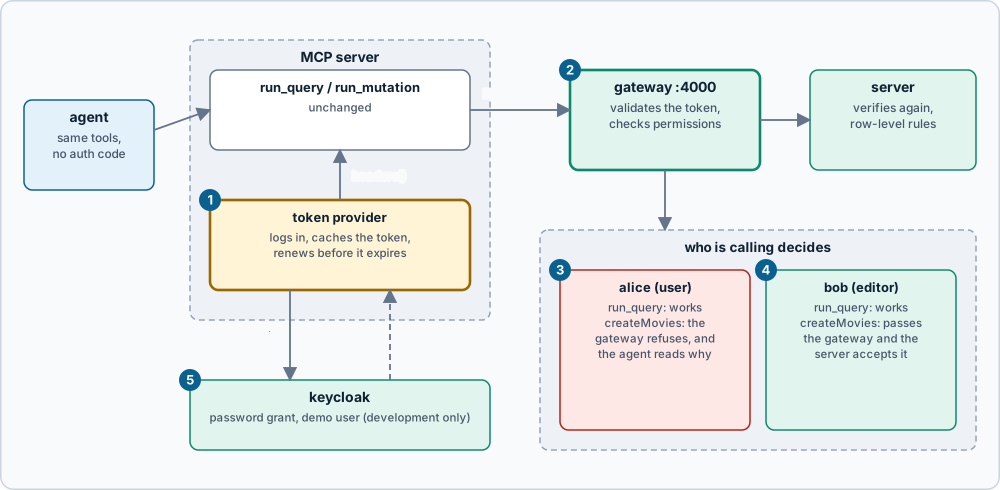
- The token provider logs in to Keycloak, keeps the token, and renews it shortly before it expires. It is passed to the tools as
headers, a function called for every request. - The gateway (
:4000in the auth setup) validates the token and checks what the user’s role may do. - alice (role
user) can read. A catalogue mutation is refused by the gateway, and the refusal text reaches the agent in the tool result, so it can tell the user why. - bob (role
editor) passes the gateway and the server accepts it. - Keycloak here is the development realm from
grandstack-auth.
Nothing in grandstack-server, grandstack-web or grandstack-auth changes, and the tools themselves are unchanged.
The idea
- Point
GRAPHQL_URLat the gateway (it is athttp://localhost:4000/graphqlin the auth setup, so the default URL already works). - Give the executor a way to get a token.
headersaccepts a fixed object or a function that returns one (createTools({ config, headers })), so a function can fetch and refresh tokens. - The agent then has exactly the permissions of that user’s role.
The example
examples/with-auth/token-provider.ts logs in with the password grant using the realm’s grandstack-smoke client and caches the token until 30 seconds before it expires (concurrent calls share one login):
const tokenProvider = createTokenProvider({
  realmUrl: "http://localhost:8081/realms/grandstack",
  clientId: "grandstack-smoke",
  username: "alice", password: "alice-pass",
});
const server = createMcpServer(createTools({ config: loadConfig(), headers: tokenProvider }));
examples/with-auth/server.ts is that, wired to stdio. Register it with a client like the plain server:
AUTH_USER=alice npx tsx examples/with-auth/server.ts
Or in Claude Code: claude mcp add grandstack-alice -e AUTH_USER=alice -e ALLOW_MUTATIONS=true -- npx --prefix /path/to/grandstack-agents tsx /path/to/grandstack-agents/examples/with-auth/server.ts.
The same works for the direct approach: graphqlTool(config, tokenProvider).
Run the check
Start the auth stack (docker compose -f compose.yaml -f compose.auth.yaml up --build in grandstack), then:
npm run auth:check
It reports 9 passing checks: an anonymous agent can read but is refused writes (“Unauthenticated”); alice can read, is refused createMovies (Forbidden: "createMovies" needs the "catalog:write" permission), and can create a review as herself; bob can create a movie and delete it again; and the stdio example server, authenticated as alice, reads but cannot create movies.
Practices
- Least privilege. Give an agent the weakest role that does the job. A
usertoken cannot change the catalogue even if the agent tries. - Read-only is not a substitute.
ALLOW_MUTATIONS=falseonly affects this MCP server. A direct caller of the server gets nothing from it; the gateway’s roles do the real work. - Token lifetime. The development realm issues 5-minute tokens; the provider renews before expiry. A production client would also handle a revoked token.
- Keep tokens out of prompts and logs. The tools never put the token in a result, and errors name the user, not the token. Do not add it to system prompts.
- Not for production. The password grant and
grandstack-smokeclient are for the demo realm. Production agents should use a client-credentials grant (a service identity) or a user-delegated flow, with a client created for the agent. See swapping providers ingrandstack-auth. - Memory later. Agent memory, the next phase, is where auth becomes part of the design rather than an add-on.
Source: grandstack-agents/docs/adding-auth.md (this page is a copy; edit it in the repository)